how i use claude code ii

Last year I wrote How I Use Claude Code about my learnings from researching different coding agents. Over the last 9 months, Claude Code has emerged as my go-to harness (though I've been increasingly using Codex, as well as Conductor or my own agents for certain tasks). The underlying models have gotten significantly better. Claude Code has become so much more than just a coding agent, it's a general harness for everything.
I've used Claude Code to look for reservations, trade stocks, review emails, and even produce videos. And also to produce a lot of code. This article goes over some of the tips and tricks I've picked up along the way.
Note, I will use "Claude Code" and "Claude" interchangeably, but I'm referring to Claude Code (or any agentic loop, really).
Progressive Disclosure
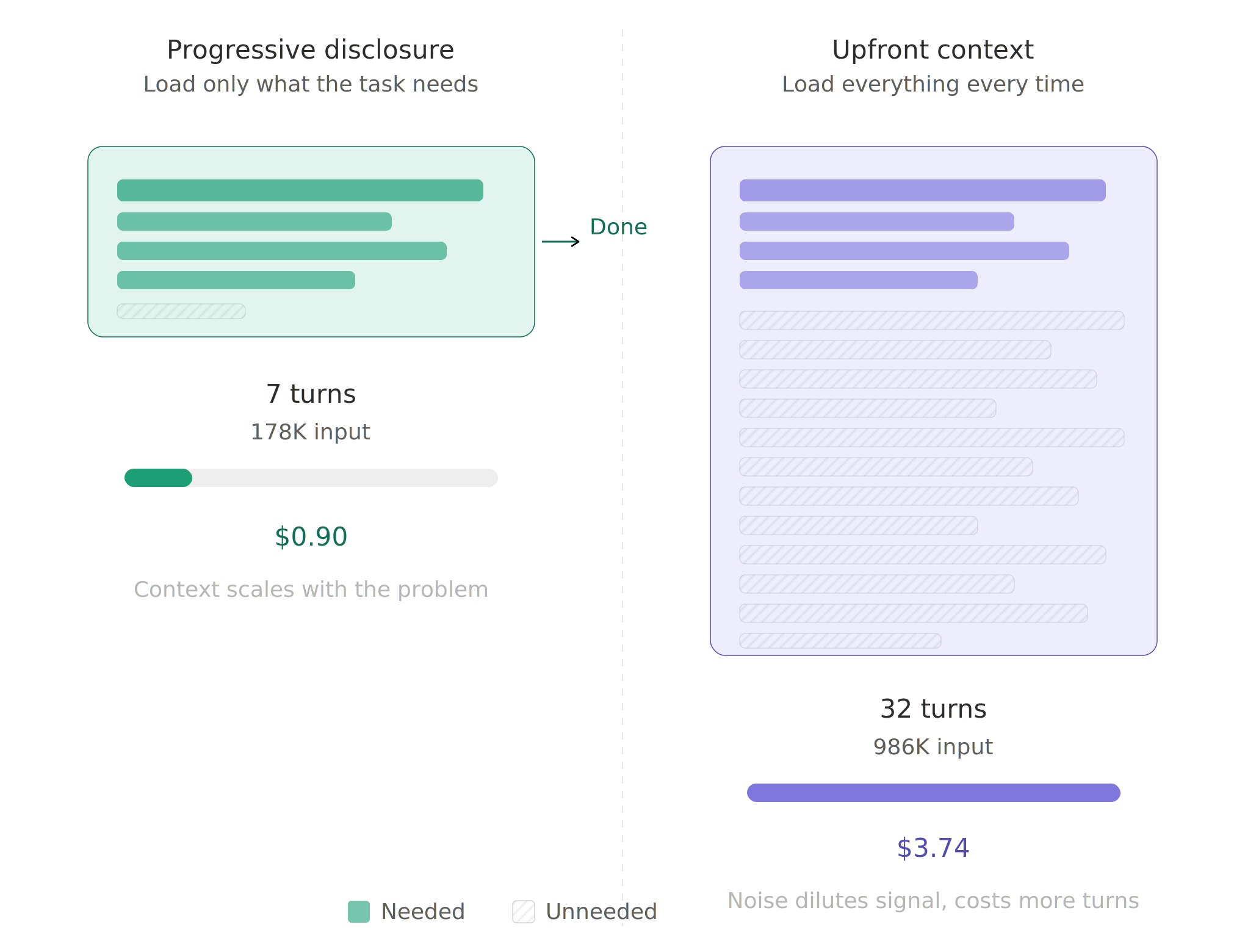
What is Progressive Disclosure?
Progressive disclosure is where "Claude loads information in stages as needed, rather than consuming context upfront" (Anthropic). The idea is to let Claude decide what it needs to know, and to provide an environment where it can get those answers in an efficient way.
Universal facts and non-negotiables should live in a CLAUDE.md, which will always get injected into context when Claude is in its directory. There is a dimension of progressive disclosure here (via nested CLAUDE.md), but the litmus test remains: is this information universally required across all queries in this directory? Everything else should live in a subdirectory CLAUDE.md, SKILL.md or a subagent task (more on those below).
Ultimately, Claude will be most effective at solving any task when it has the least amount of context required to solve it in the most efficient way. In order to achieve that perfect state, you must find balance between upfront context and progressive disclosure. This is just a general framework of thinking, practicality and model capability will ultimately determine the best context strategy for your environment. I typically start with progressive disclosure, and if Claude struggles to find it on its own, I'll put a nudge in the upfront context (e.g. always load /db skill before using the db-query tool).
Tip: periodically ask Claude to look at past conversations and propose skills or CLAUDE.md refinements to make him more efficient, or call /refine-context.
CLAUDE.md
In last year's article, I proposed using nested CLAUDE.md files as the main mechanism of progressive disclosure. The idea was to give Claude context based on where it was at, be it exploring a folder or working on a file.
However, keeping CLAUDE.md files updated is difficult and without discipline they will drift. The models have gotten much smarter and can search more effectively (especially with lsps). I've since shifted to the "universal facts across all queries" scrutiny test for CLAUDE.md files and the number and size of the files have reduced significantly, while overall performance and consistency have increased.
Skills
Skills allow you to provide context for concepts and let Claude decide when those concepts are relevant. If CLAUDE.md are for universal facts across all queries, skills are for universal facts across some queries.
For example, I have a database tool so Claude can execute read-only sql in our prod/staging databases. I also have a skills/db/SKILL.md file that contains important schemas, business definitions, and helpful heuristics about the data. Asking Claude a medium-complexity, unseen question about our database:
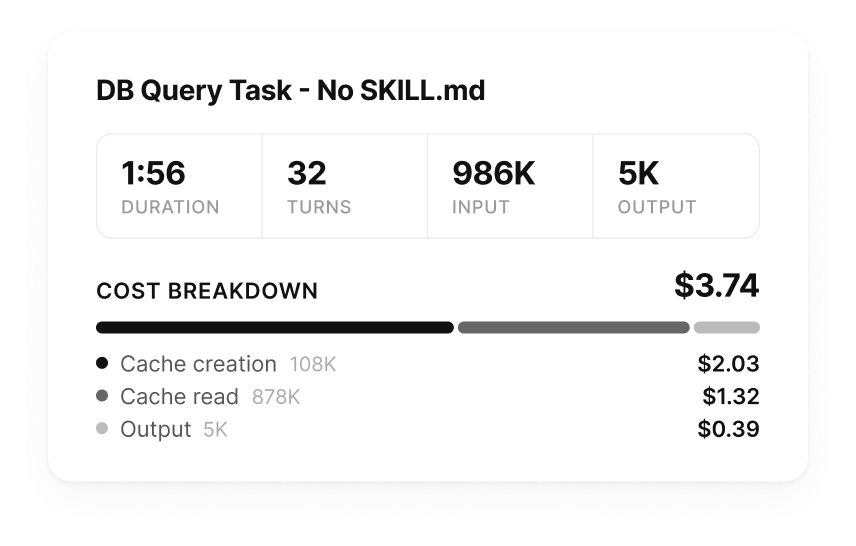
DB query without SKILL.md
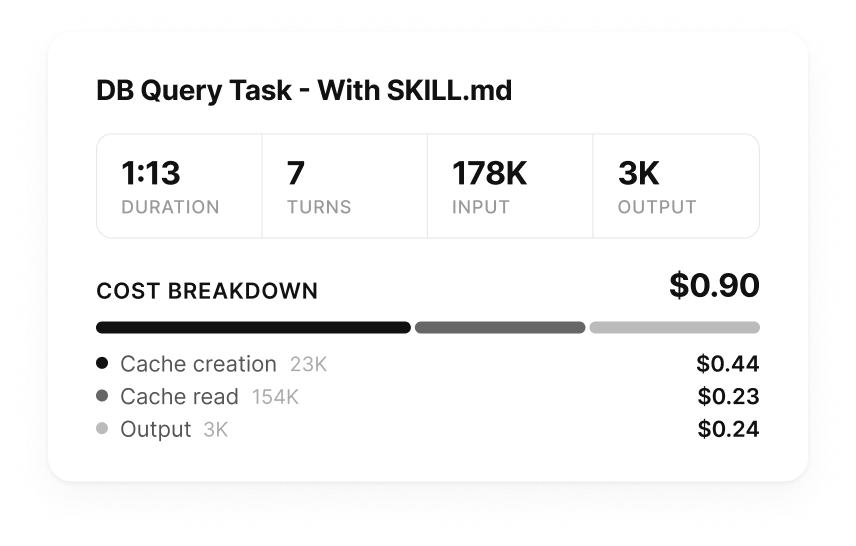
DB query with SKILL.md
Skills also provide a progressive disclosure mechanism. A skill lives in .claude/skills/<skill-name>/SKILL.md, and you can put any other files/folders in that directory, then reference them from the SKILL.md. For example, a db skill folder might look like:
.claude/
└─ skills/
   └─ db/
      ├─ SKILL.md
      └─ examples/
         ├─ analytics.md
         └─ debug.md
---
name: db
description: Query the company database
---

...
## Analytics queries
If the query is related to analytics, look in `examples/analytics.md`
Skills also support ! bash commands for dynamic context injection:
---
name: db
description: Query the company database
---

...

## Core Table Schemas
!`./scripts/get-core-schemas.sh` <- Claude Code will see the output of this

...
Skills will save you time, money, and allow Claude to solve more complex problems more consistently. Check out Anthropic's Skill Guide and their Advanced Usage docs to learn more about skills.
Prompting
The prompt is the easiest place to get lazy. In automated Claude systems, you can avoid some of that. But when you're driving, it's important to remember progressive disclosure principles.
Claude is pretty smart about automatically using subagents to manage context in complex work. However, I often construct my prompts to include "subagent" or "team" wherever I have any research or context gathering aspect of a prompt. For example, consider a prompt for getting test cases for a TDD implementation (with tests already written):
- Write the implementation based on your plan.
- Spawn subagents to rerun each test. Iterate until all pass.

Rules:
- Subagents run all tests - you never execute tests directly.
- You're not done until every test is green.
Subagents and Teams
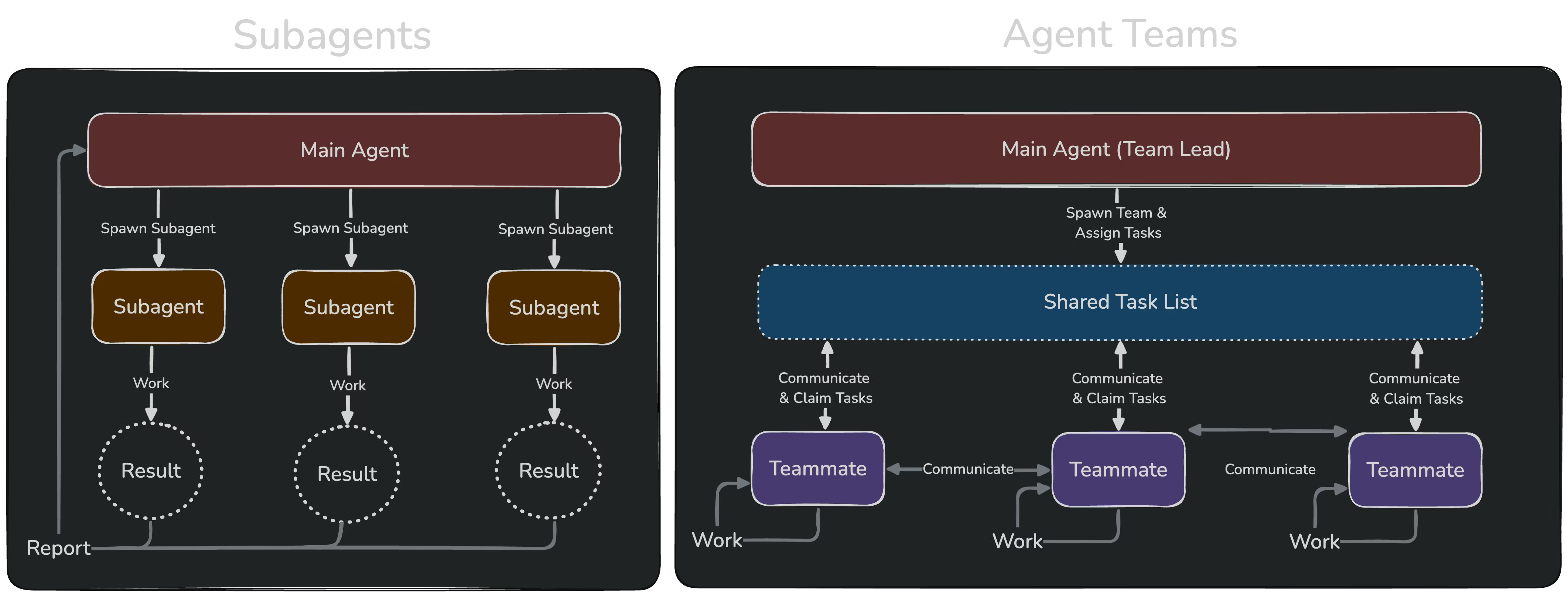
https://code.claude.com/docs/en/agent-teams#when-to-use-agent-teams
Subagents
Subagents are delegate Claude Codes, with their own isolated context. They can only communicate with your main Claude Code.
They are great for summarizing and searching for things. You can send subagents off in different directions or have them decompose a single problem. Here are some ways I use subagents:
- summarizing/searching logs
- lightweight review layers (e.g.
... then spawn a subagent to run /review and iterate with it N times) - running tests or db queries
- web crawling (paired with crawling tools)
- general direction (e.g.
...use subagents to efficiently manage your context)
You can create custom subagents if you find yourself often using the same ones or want more control over their configuration.
Teams
Teams are collaborative, interconnected Claude Codes. Your main Claude is the orchestrator, and your team can communicate with your main Claude and with each other.
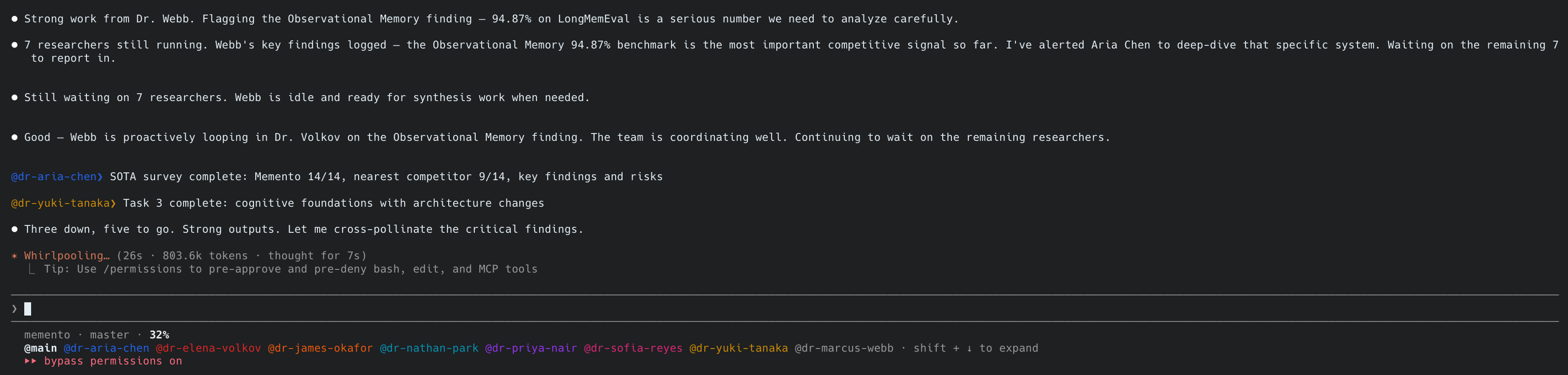
Research team
It's kind of like Conductor, but instead of you managing multiple Claudes, your Claude is managing multiple Claudes for you. Teams are the big guns, they will eat through your context but if you compose them well, they can tackle huge problems. Some ways I've used teams:
- one-shot implementations
- debug tricky bugs across multiple systems
- conduct deep research/experiments with arXiv MCP
- quant trading team
Agent Teams is currently an experimental feature, you can enable them by running:
export CLAUDE_CODE_EXPERIMENTAL_AGENT_TEAMS=1
or telling Claude to update your config (he has a built-in skill):
use the config skill to update your config to add CLAUDE_CODE_EXPERIMENTAL_AGENT_TEAMS=1
Once it's enabled, Claude will use teams. I've found it often needs a nudge, so I'll say "use TeamCreate tool" and describe the team or tell it to create a suitable team. For example, consider a workflow debugging team:
---
name: debug-workflow
description: Debug failing workflow(s)
---

## User context:
$ARGUMENTS

## Task
Investigate the failing workflow(s) and fix.

Spawn a team (using teamcreate tool) to investigate and fix the issue:
- Temporal Expert: investigates temporal and can answer temporal questions. Uses /temporal
- Database Expert: investigates database and can answer data questions. Uses /db
- Staff Software Engineer: supreme commander of the people's codebase
- Senior Staff QA Engineer: general secretary of code correctness

Once the team is complete, post a report to the linear ticket, including:
- timeline of failure(s)
- root cause
- repro steps
- summary of fix
- testing strategy/results

Spawn additional team members as you see fit.
Spawn subagents for research as needed.
or a video production team:
---
name: newsroom-pipeline
description: Research, write, produce, and render a news video
---

## User context:
$ARGUMENTS

## Task
Produce a complete news video package from topic to final render.

Spawn a team (using teamcreate tool) organized into rooms:

### Research
- Researchers: broad search, produces structured brief
- Fact Checkers: cross-references sources, verifies claims

### Writers
- Head Writer: owns the final script, terse news style
- Story Editors: structure, hooks, pacing, storyboard

### Production
- Footage Hunter: news footage + stock footage + backgrounds
- Voice Producer: ElevenLabs TTS + audio mixing
- Graphics Producer: maps, charts, diagrams, overlays

### Directors
- Lead Director: Remotion composition + render

### Post-Production
- QA Producer: quality review, accuracy check

Spawn additional team members as you see fit.
Spawn subagents for research as needed.
I recommend reading Addy Osmani's article for more details about teams/swarms.
Codex agent
Another fun "subagent" I like to use is Codex, which is my go-to for code implementation. To add the codex subagent, you can run:
claude mcp add --scope user --transport stdio codex -- codex mcp-server
This will give Claude a "codex" tool that will kick off a Codex session it can interact with. You can use "codex tool" and "subagent" interchangeably in your prompts to nudge Claude.
Additionally, while Teams (via TeamCreate) don't (yet) have the ability to spawn subagents or other teams, they can call the "codex" tool for additional levels of isolated context. Codex itself supports subagents. Consider the prompt:
Let's delve into SOC-2 compliance for this repo, no cheating.

Use the TeamCreate tool to spawn 5 team members, one per SOC 2 Trust
Service Criteria (Security, Availability, Processing Integrity,
Confidentiality, Privacy).

Each team member spawns 3 Codex sessions:
  1. Gap Analysis — scan the codebase and live AWS state
  2. Remediation — generate Terraform patches + app code fixes
  3. Evidence — produce runnable audit scripts + control narratives

Each Codex session spawns 2 subagents splitting the work along
infra vs. application boundaries.

When all 5 teams report, deduplicate cross-TSC findings, validate
every gap maps to a remediation, and produce the auditor-ready
package with a readiness scorecard.
t = 5 team members, c = 3 Codexes, a = 2 Codex subagents, 1+t(1+c(1+a)) = 51 isolated context windows from a single orchestrator prompt! Probably not too practical today, but I anticipate setups like these will become more common with the next generation of models.
Hopefully Anthropic will add the ability for Teams to at least call subagents (or even other teams!) in the future, see Recursive Language Models.
When to use Subagents vs. Teams
I typically use subagents to manage context and use teams to tackle "hard" problems.
Consider a well-defined feature request that requires frontend and backend changes, I may use a team with 3 members: frontend engineer, backend engineer, and a QA engineer. Frontend and backend aren't tightly coupled, they may want to communicate, but they can operate independently. The QA engineer needs to be able to iterate with both engineers.
Looking Ahead
Environments
My mental framing when using Claude Code has been shifting from building setups for myself to drive to building "environments" for Claude to drive itself. Consider Pacman: at every step, Pacman can:
- see the entire board (prompt)
- move up, down, left, or right (tools)
- maintain a game state: position, pellets, power pellets, ghosts, and fruits (sqlite)
- modify game state (tool effects, hooks)
If you give Claude the right environment, it could play Pacman! If you give it a refinement mechanism, it can learn from past sessions to improve its capabilities over time. I try to put myself in the shoes of the persona who would do the work and consider what context, capabilities, and feedback would this person need to do X? I try to leave process to the models.
Each generation of new models requires less human involvement for a set of tasks. As models continue to improve, I think our jobs as "AI engineers" will increasingly be focused on building environments where agents can operate, improve, and be observed.
Factories
Coordinating teams of Claudes becomes much easier when you have solid environments. If you have the right skills, tools, and feedback mechanisms, all you need is a way to communicate work to Claude. Consider a simple webapp, your repo may have:
- Skills: new-feature, bug-fix, component-system, api, db, testing, submit-pr
- CLAUDE.md: top-level style guide/conventions
- Scripts: custom linter rules
- Tools: database query tool, chrome mcp tool, playwright tool (for writing tests)
- Plugins: typescript-lsp, frontend-design
- Hooks: confirm tests are present and pass on Stop
You can use something like OpenAI's Symphony or even something lighter-weight (like /loop) leveraging Claude's --remote flag (which lets you run Claude in Anthropic cloud sandboxes). Paired with Linear or GitHub issues, your team can focus on product design and well-defined feature specs and let your agents handle implementation and review.
You can automate further with skills/hooks for including videos/screenshots, preview builds, and Slack notifications. You can add Claude and/or Codex PR review for an extra quality layer.
I don't quite trust models to handle work end-to-end, but I've been experimenting with factories and anticipate I will be using them more over the coming months. Once the models are there, and they will get there, the only bottleneck will be the environment.
Appendix
prol: Quant Team
tburnam/prol — proletariat, an AI quant team trying to escape the permanent underclass
prol is a Claude Code set up for a self-improving, automated trading bot that demonstrates some of my favorite patterns for environment building. You'll need to set up an alpaca account and get an API key. There are some optional MCPs (exa, firecrawl) as well. It's self-documenting so just ask Claude in the repo if you have any questions.
I run my prol every 5 minutes during market hours and every hour outside of them. Over the last 2 weeks, prol has generated an impressive 11% return and also serves as an interesting news feed.
/refine-context
A skill to help refine your repo's context to better follow progressive disclosure principles. Can install with:
npx skills add https://github.com/tburnam/refine-context
Chrome DevTools MCP
I've found the Chrome DevTools MCP to be faster than playwright for Claude Code purposes. You can go to: chrome://inspect/#remote-debugging in Chrome and turn on "debugging for this browser" to give Claude access to your current browser. Useful for interacting with webpages you're logged into. Then run:
claude mcp add chrome-devtools --scope user -- npx chrome-devtools-mcp@latest --no-usage-statistics --auto-connect
ArXiv MCP
claude mcp add arxiv-mcp-server -- uv tool run arxiv-mcp-server
GoDaddy MCP
claude mcp add godaddy --transport http --scope project https://api.godaddy.com/v1/domains/mcp